
Authentication via Ebeco Connect
Here’s how to authenticate via Ebeco Connect and the Open API.
Authentication
Authentication to Ebeco's API is done using a Bearer Token which is acquired from /api/TokenAuth/Authenticate. Usernames and passwords are the same as used in the Ebeco Connect app. In the examples below we use Postman for requests.
The Abp.TenantId parameter should always be passed in the Header and set to 1.

Username and password is then sent as a POST request to /api/TokenAuth/Authenticate.
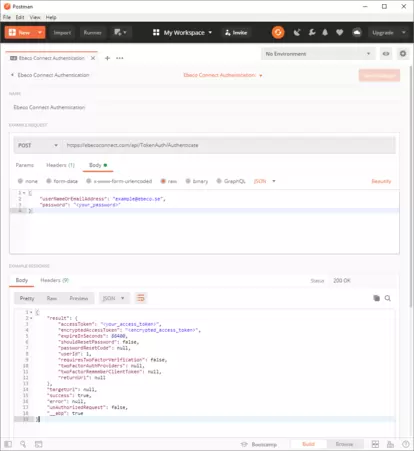
The accessToken parameter returned in the response is then used to authenticate to the Ebeco API.
Example:

We send a GET request to /api/services/app/Devices/GetUserDevices and authenticate the header with "Bearer <accessToken>". A JSON list of the logged in user’s thermostats is returned.